India Dubai London

Demos · Accounting practice CRM

Accounting practice CRM: Kelvermoor & Co.

Example business Accounting practice · Dubai

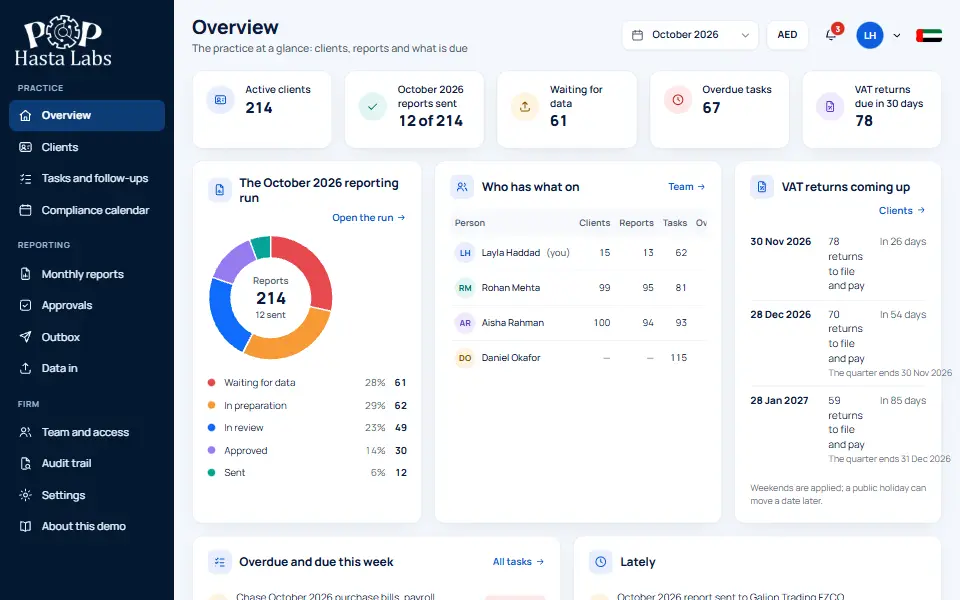
Client CRM and monthly reporting for an accounting practice: 214 clients, VAT and corporate-tax deadlines worked out from the rules, reports whose every figure adds up, and four people who each see only what they should.

accounting.pophastatesting.tech
Accounting practice CRM demo screen: Kelvermoor & Co.

Sound familiar?

The problems this Accounting practice CRM ends

The problem

Tax deadlines are typed in by hand, and one gets missed.

What changes

Deadlines are worked out from the rules, with weekends and holidays taken into account.
The problem

Everyone can see every client's figures.

What changes

Four roles, each seeing only what they should. The coordinator sees no figures at all.

The problem

Reports reach clients before a partner checked them.

What changes

Reports go to clients only after a partner approves them, and every figure adds up.

What you get

What this Accounting practice CRM does for you

Every client in one place

The demo runs 214 clients, each with their own deadlines and reports.

Monthly reporting built in

Monthly reports for each client, checked so every total ties back.

A secure client portal

Clients set their own password, and five wrong tries lock it.

Tax worked out to the rules

Corporate tax is worked out band by band, the way the rules set it out.

Inside the demo

Accounting practice CRM features you can try

12 things you can click through today, in plain words. Yours can have all of them, or only the ones you need.

  • Staggered VAT quarters

    Each client sits on one of three quarterly VAT cycles, so returns are spread across the year.

  • Deadlines on every client page

    Each client's page lists the coming VAT and corporate tax filings, with a review a week before each VAT return.

  • VAT review flags

    Flags invoices where VAT is not 5%, customers with no tax number, and adjustments with no note.

  • Small Business Relief warning

    If a client on the relief is heading past AED 3 million in revenue, the report says so.

  • Month-end checklist

    A report cannot go for review until bank statements, sales, purchases, payroll and adjustments are in.

  • Reports tracked by stage

    Every client's report for the month, by stage, with your own queue and the day each client expects it.

  • Send back with a note

    A partner can send a report back with a note, or withdraw an approval before the email goes.

  • Summaries written from the figures

    Plain sentences built from the report's own numbers. They compare and add up, but never guess a cause.

  • Who owes what, by age

    Money owed to and by each client, split by how many days it is overdue.

  • Import from Excel or CSV

    Load a client's sales file. Rejected rows are named, and the import can be undone.

  • Documents tick the checklist

    Clients upload bank statements, invoices and payroll in the portal, and the month's checklist ticks itself.

  • Your logo and colours

    Client pages, printouts and the portal carry your practice's logo and colour.

Try the demo yourself (opens in a new tab)

Operationally accurate

The rules this Accounting practice CRM keeps

  1. 01

    Deadlines from the rules

    VAT and corporate-tax deadlines are worked out from the rules rather than typed in by hand.

  2. 02

    Each person sees only their part

    Four people work in the system and each one sees only the clients and figures their role allows.

From this demo to your system

How we build yours

Same idea, shaped around your business: your stages, your words, your rules.

  1. 01

    Tell us how you work

    A short call about your business, your rules and the tools you use today. You get a free quote.

  2. 02

    See the plan before any code

    A written plan of every screen and rule, so you know exactly what you are getting.

  3. 03

    Click through it every two weeks

    A working demo of your own system, like this one, so you can steer it as it grows.

  4. 04

    Go live, and own it

    Most systems are live in 6 to 12 weeks. Once it is paid for, the code is yours, and our yearly AMC keeps it running, with free patent-pending AI governance included.

Get a free quote

Questions

What people ask before they start

We are a CPA firm in the US or a CA firm in India. Can it use our deadlines?

Yes. This demo follows UAE tax rules. We build yours around your country's deadlines and your own review process.

Does it use AI on our clients' figures?

Only if you want it to. If you add AI, our patent-pending SCRS layer keeps client names away from the model.

How long does it take, and who owns it?

Most systems go live in 6 to 12 weeks. Once it is paid for, the code is yours, and our yearly AMC keeps it running.

Built into every system

  • AI governed by SCRS

    Where a system uses AI, the patent-pending firewall swaps client details for tokens before any model reads them.

  • Nothing sends itself

    The system drafts, and a named person releases every message.

  • Every action logged

    Refusals, overrides and exports land in a log nobody can quietly edit.

Keep exploring

More demos to click through

Tell us how your business runs

We'll show you what it could look like, measured to fit before anything is built.