India Dubai London

Demos · Law firm CRM

Law firm CRM: Marlow & Finch

Example business Solicitors · United Kingdom

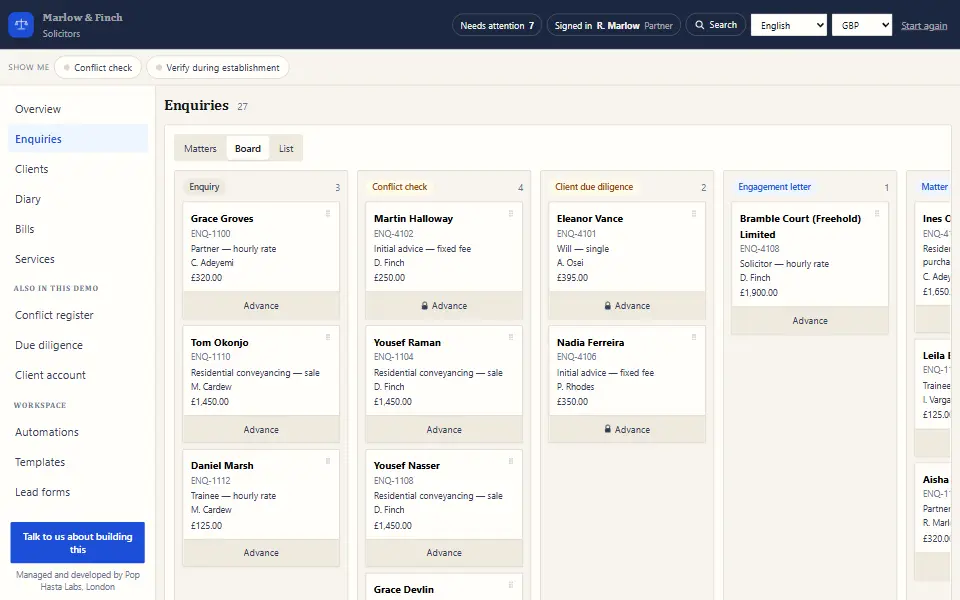
Enquiries, clients, the diary, bills and services for a firm of solicitors, with the conflict register, due diligence and client account in the same place.

firm.pophastatesting.tech
Law firm CRM demo screen: Marlow & Finch

Sound familiar?

The problems this Law firm CRM ends

The problem

A matter opens before anyone runs the conflict check.

What changes

No new matter opens until the conflict search is clear. Every search is logged with the name, any match and the date.
The problem

Work starts before the client's ID is verified.

What changes

The engagement letter waits for verified ID. If you must go early, the system asks for a reason and keeps it on file.

The problem

Client money and office money get mixed up in spreadsheets.

What changes

Every matter has its own client and office account ledger, so you always see what is held and what is billed.

What you get

What this Law firm CRM does for you

A conflict register built in

Search a name once and the result is saved with the date, so you can show your checks.

Every matter, tracked

Fee earner, stage and file destruction date on every matter, so nothing is kept too long.

Bills and services together

Quote, bill and track services from the same place you run the matter.

Letters you approve

Letters and reminders are drafted for you. A named person sends each one.

Inside the demo

Law firm CRM features you can try

12 things you can click through today, in plain words. Yours can have all of them, or only the ones you need.

  • Enquiries filed under matters

    You land on your matters, with each enquiry filed under its matter and new ones waiting to be filed.

  • A nine-step matter pipeline

    Enquiry, conflict check, due diligence, engagement letter, open, work in progress, bill, paid and closed.

  • ID override with set grounds

    Going ahead before ID is verified shows the regulation, asks for one of three set grounds, and logs the choice.

  • Due-diligence register

    For each person or company: the evidence used and a review date, shown as verified, pending or review overdue.

  • Area of law on every matter

    Property, employment, wills and probate, or commercial, and a matter can close as declined for a conflict.

  • All of a client's matters

    The client record lists every matter, with its status and destruction date.

  • Deadlines, hearings and meetings

    Deadlines show all day, hearings book two hours, and meetings book an hour and a room.

  • Partner, solicitor and trainee rates

    Three hourly rates sit beside fixed fees for conveyancing, wills and probate on the same bill.

  • Disbursements without VAT

    Searches and court or registry fees can be billed without VAT, with the basis shown on the line.

  • Bills due in 30 days

    Issuing a bill sets it due in 30 days, and it shows as overdue once that date passes.

  • The rules, linked on each service

    A service on an enquiry lists the checks ahead, with links to the rules behind them.

  • A diary that refuses clashes

    Double-booking a person or a room, or booking outside hours or in the past, is refused with the reason.

Try the demo yourself (opens in a new tab)

Operationally accurate

The rules this Law firm CRM keeps

  1. 01

    Conflict check

    A new matter cannot open until the conflict check is clear, so nobody acts against an existing client by accident.

  2. 02

    Verify during establishment

    Identity checks are tracked while the relationship is being set up, and work that depends on them waits until they are done.

From this demo to your system

How we build yours

Same idea, shaped around your business: your stages, your words, your rules.

  1. 01

    Tell us how you work

    A short call about your business, your rules and the tools you use today. You get a free quote.

  2. 02

    See the plan before any code

    A written plan of every screen and rule, so you know exactly what you are getting.

  3. 03

    Click through it every two weeks

    A working demo of your own system, like this one, so you can steer it as it grows.

  4. 04

    Go live, and own it

    Most systems are live in 6 to 12 weeks. Once it is paid for, the code is yours, and our yearly AMC keeps it running, with free patent-pending AI governance included.

Get a free quote

Questions

What people ask before they start

We practise in the US or India. Will it follow our rules?

Yes. This demo follows UK rules. We build yours around your jurisdiction's rules and your firm's own policies.

Is client data safe if we use AI?

Where your system uses AI, our patent-pending SCRS layer swaps client names for tokens before any model reads them.

How long does it take, and who owns it?

Most systems go live in 6 to 12 weeks. Once it is paid for, the code is yours, and our yearly AMC keeps it running.

Built into every system

  • AI governed by SCRS

    Where a system uses AI, the patent-pending firewall swaps client details for tokens before any model reads them.

  • Nothing sends itself

    The system drafts, and a named person releases every message.

  • Every action logged

    Refusals, overrides and exports land in a log nobody can quietly edit.

Keep exploring

More demos to click through

Tell us how your business runs

We'll show you what it could look like, measured to fit before anything is built.